Helipad icon

Helipad

A floating macOS panel with every open PR Claude Code created for you — CI state, review state, and a one-click jump back into the Claude session that wrote it.

⬇  Download for macOS View on GitHub
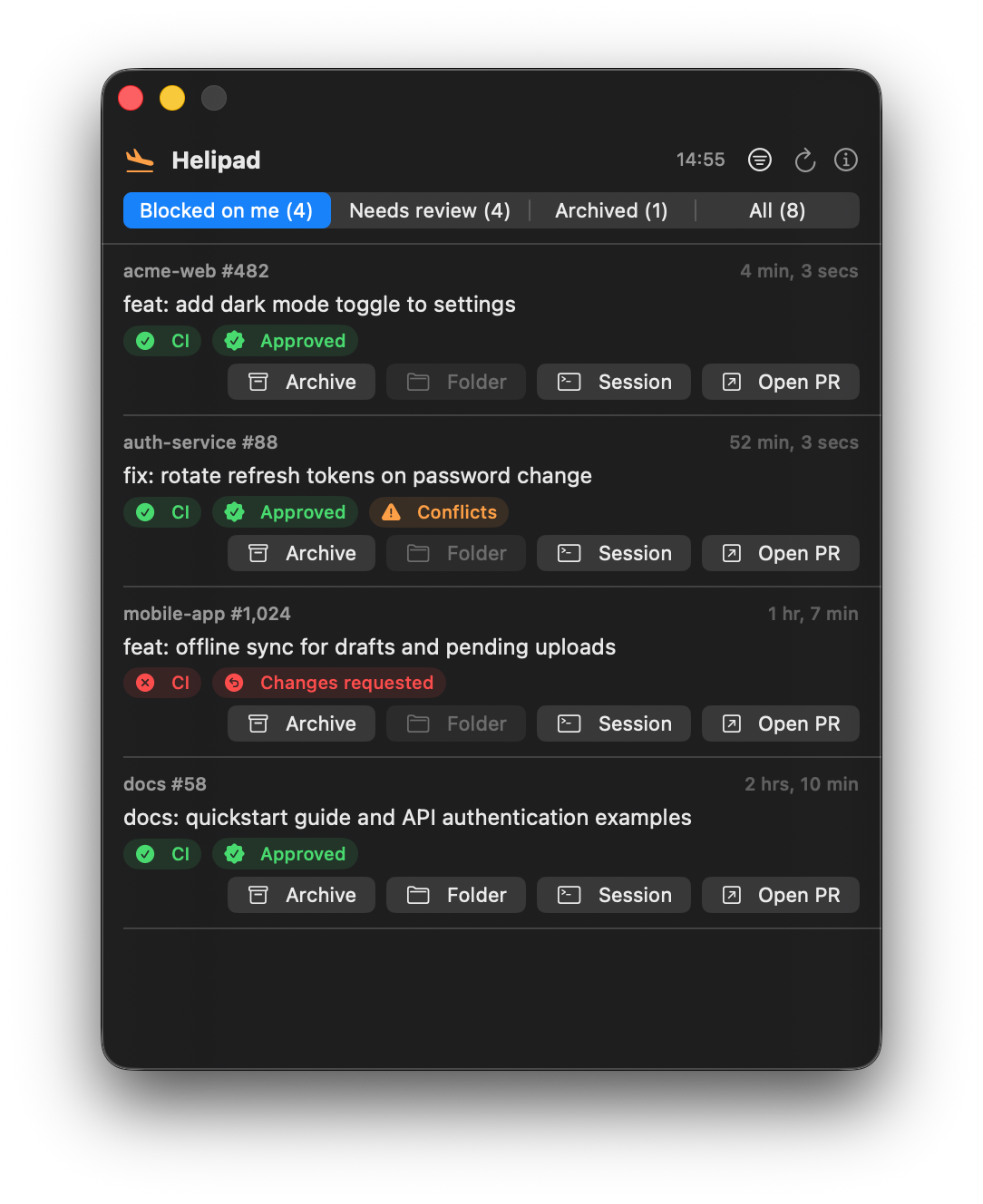
Helipad floating panel showing open PRs with CI and review badges

When Claude Code agents are opening pull requests for you all day — across many repos, from many sessions — the bottleneck becomes you: noticing which PRs are green, which need another round, and which agent session to jump back into. Helipad keeps that list hovering on top of everything, always current.

Features

Status at a glance

Every PR shows CI state, review decision, and merge-conflict warnings — sorted by most recently updated, refreshed every 5 minutes, with more loading as you scroll.

CI ✓Needs reviewConflicts

Shows what needs you

Status filters default to PRs awaiting your action — approved and ready to merge, or sent back with changes requested. Toggle in any status you want to watch.

Finds Claude's PRs automatically

Searches GitHub for open PRs you authored containing the "Generated with Claude Code" attribution — no configuration, works across all your repos.

Jump into the session

The Session button opens the Claude Code session behind a PR — attaching live with claude attach if the agent is still running, or resuming it if finished, using Claude Code's own job-to-PR links.

Stays out of the way

A non-activating floating panel: always on top, visible on every Space, draggable anywhere, with a menu-bar toggle and no dock icon.

Per-PR actions

Archive PRs you're done with into a separate tab, open the local repo folder in Finder, or open the PR in your browser — right from each row.

Native & tiny

Pure Swift (AppKit + SwiftUI), zero dependencies, talks to GitHub through your existing authenticated gh CLI.

Install

⬇  Download Helipad.dmg (latest)

Open the DMG and drag Helipad into Applications. Signed and notarized — no Gatekeeper warnings. Requires macOS 13+ and an authenticated gh CLI. Or build from source:

# Requirements: macOS 13+, gh CLI authenticated (gh auth login)
git clone https://github.com/ronreiter/helipad.git
cd helipad
swift build -c release
.build/release/Helipad &

To start at login, copy .build/release/Helipad somewhere stable and add it as a Login Item in System Settings → General → Login Items.